
A controlled, database-driven workflow
EPCplanner is a native desktop application built around a single relational database. Every module operates on the same data, the same WBS, and the same period structure, so a single progress update cycle keeps planning, commercial and reporting outputs consistent with each other.
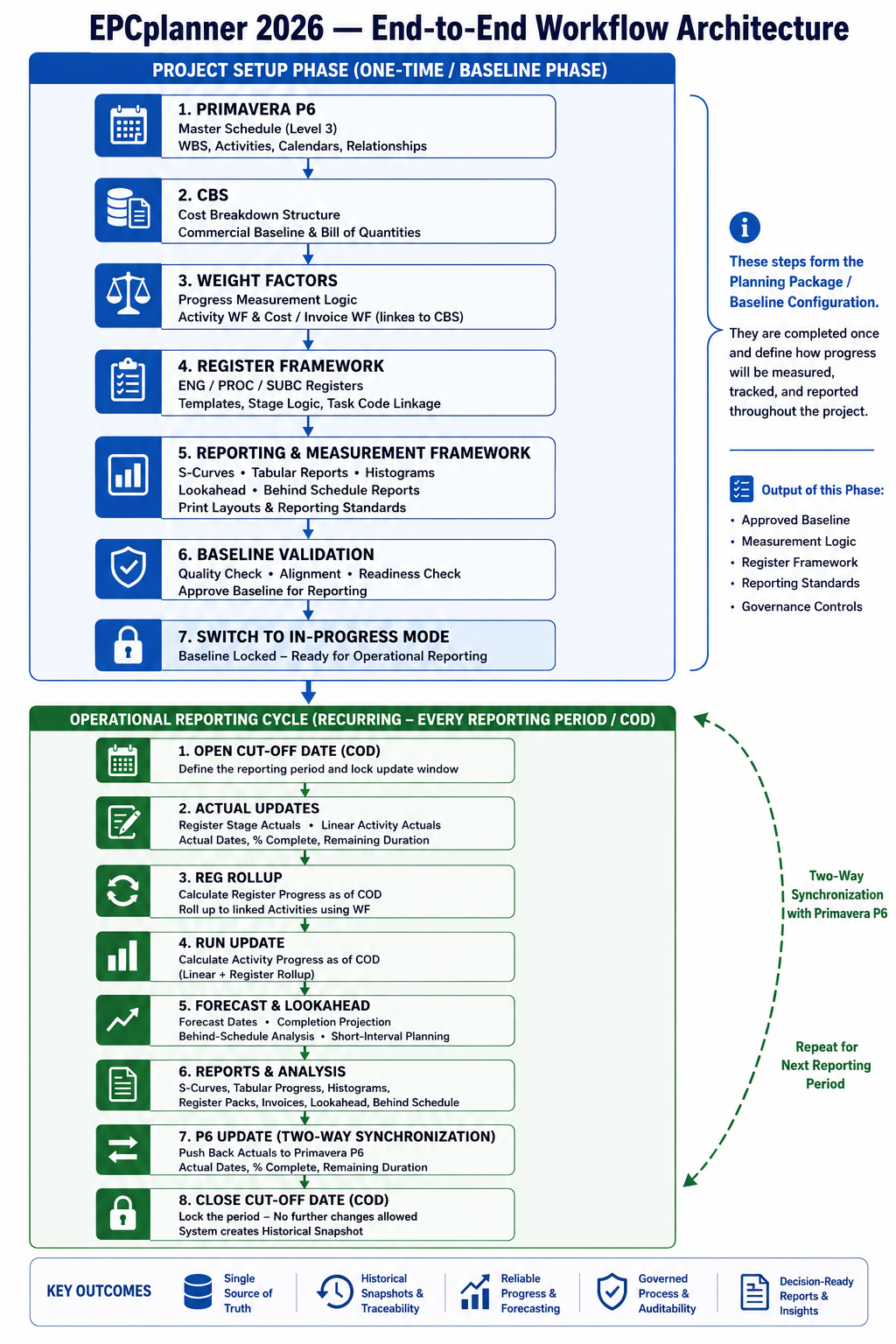
Two phases. One controlled cycle.
EPCplanner's workflow divides into a one-time Project Setup Phase and a recurring Operational Reporting Cycle that repeats for every Cut-Off Date.
Completed once before any reporting begins. Establishes the schedule baseline, commercial structure, Weight Factors, and register framework.
Repeats for every Cut-Off Date. Captures actual progress, recalculates register and activity status, generates reports, synchronises with the master schedule, and closes with a locked Historical Snapshot.
Progress from actual deliverables, not estimates
The Register Framework is the core progress measurement engine. Engineering, Procurement, and Subcontract deliverables are managed through registers using configurable stage templates. Each stage represents a measurable milestone in the deliverable lifecycle and carries a proportional Weight Factor contribution.
Because all calculations originate from controlled register data, progress reporting remains traceable, auditable, and consistent across all project functions. The same progress dataset is used for S-curves, histograms, tabular reports, forecasting, lookahead analysis, behind-schedule analysis, and schedule synchronisation.
- Stage completion drives automatic rollup to linked schedule activities
- Weight Factors distribute measurable planning weight from the CBS distribution
- Quality check confirms every item has a valid template and required setup
- Validation highlights alignment gaps between register dates and schedule dates
- Multiple templates with different stage counts coexist in the same project
- Register items can replace fragile Excel networks; Excel is used for import and export only
Why the database design matters
Every module: CBS, registers, forecasting, reporting, operates on the same database, the same WBS, and the same period structure. A single progress update keeps all outputs consistent.
| Data point | Spreadsheet-based environment | EPCplanner |
|---|---|---|
| Data location | Scattered across multiple Excel files held by different teams, manually consolidated at period end | One project database covering schedule, commercial and all register data |
| Progress calculation | Different methodologies per discipline; estimated percentages entered manually | Consistent WF-based calculation from register stage actuals, applied uniformly |
| Schedule alignment | Manual cross-checking of register dates against schedule activity dates each period | Each register item linked to an activity; validation reports day-delta gaps automatically |
| Period-end data | Closed-period figures can be silently edited; tracing changes is difficult | Freeze Guard blocks retroactive entry once a Cut-Off Date is closed |
| Commercial linkage | Physical progress and invoicing tracked in separate, loosely reconciled files | CBS, Activity WF, and Cost/Invoice WF are linked; one progress update drives both |
| Audit trail | Reconstructed manually from file versions and email history, if at all | Immutable Audit Log records every controlled action with user, timestamp and detail |
Historical Snapshots, Freeze Guard and Audit Log
Three capabilities work together as a single governance system. Together they give Clients, PMC organisations and auditors confidence that reported progress figures are accurate, traceable and cannot be altered after the fact.
Historical Snapshots
Every time a Cut-Off Date is closed, EPCplanner automatically preserves the complete state of that period: register actuals, activity progress, S-curve data points, CBS earned values and the update timestamp. The resulting snapshot cannot be edited. It supports trend analysis, audit requests, claims support and retrospective performance review.
Freeze Guard
Once a Cut-Off Date is closed, Freeze Guard prevents actual dates, quantities and stage completions from being entered or modified for that period, from any module, by any user, including Administrators. The S-curve, register status and CBS earned value reported to the Client for any period will read identically six months later.
Immutable Audit Log
The Audit Log records every import, validation run, rollup, update, and report generation with the responsible user and timestamp, so any reported figure can be traced back to the action that created it. Entries cannot be edited or deleted by any user including Admin. Provides traceability, governance, claims support and audit compliance.
EPCplanner complements your scheduling platform; it does not replace it
EPCplanner is not a scheduling replacement. The master schedule remains in the scheduling platform, holding the Level 3 CPM logic, typically 5,000 to 10,000 activities for a major EPC project.
The detail that would otherwise bloat that schedule to 30,000 to 50,000 activities; individual engineering documents, individual purchase requisitions, individual subcontract deliverables are instead tracked at Level 4/5 inside EPCplanner's Register module, linked back to the relevant Level 3 activity. The master schedule stays clean and manageable for the planning team, while EPCplanner carries the operational detail and feeds summarised progress back through two-way synchronisation.
- XER file import, compatible with all scheduling platforms that produce a standard XER export
- Direct Oracle database connection (EPPM) for live two-way synchronisation
- SQL Server database connection for enterprise scheduling deployments
- SQLite standalone connection for simpler environments
- Progress push writes actual dates, physical percent and remaining duration back to the master schedule
Updating Primavera P6 in under a minute
Because actuals are captured once and rolled up consistently through Register → Activity → WBS → Project, there is no need to chase scattered Excel files or re-key data into Primavera, a process that is otherwise prone to error, duplication and misalignment.
Direct database connection
Using a Primavera profile configured in the application by the Primavera database administrator, EPCplanner connects through a database connection string: to an Oracle or SQL Server instance in a server environment, or to the SQLite database for standalone Primavera users. This is the fastest route.
Excel export and import
EPCplanner generates a structured Excel file aligned with Primavera's standard import format. In practice Primavera's activity import also requires WBS_ID, which is mapped with a VLOOKUP against the target project, since Project_ID is embedded in the WBS and changes each time a project is copied.
Which method to use
Primavera P6 does not officially support direct database writes, particularly in multi-user or cloud-hosted environments. EPCplanner supports both routes deliberately: the direct connection for fast updates where the environment allows it, and Excel export/import as the safer, recommended approach where it does not.
Controlled schedule revisions with a full approval lifecycle
Every schedule import is recorded as a named, typed Plan Version with its own immutable snapshot, approval workflow and audit trail. The active plan never loses history, and any earlier plan remains available for comparison, recovery or audit.
- Baseline: original approved schedule, created automatically on first import
- Revision: formally numbered schedule revision reflecting approved changes
- Recovery Plan: issued to address schedule slippage, with a Revised Cut-Off Date
- Rebaseline: full schedule reset formally approved by Client or PMC
- Forecast: analytical what-if scenario for comparison only (cannot become Active)
- Revised Cut-Off Date locks actual progress as of that date before new plan dates take effect
Offline-first. Designed for remote sites.
EPCplanner is a native desktop application that operates from a local or LAN-hosted database, with no dependency on cloud connectivity for daily operations.
Standalone
Single machine with local SQLite database. No server required. Full capability with no network dependency.
LAN ServerIn Progress
Multi-user access over a local network with a shared SQL Server backend, currently completing enterprise validation. No internet required. Role-based access will control which user can see and modify.
Enterprise
Direct connection to existing Oracle EPPM or SQL Server scheduling platform database for live two-way synchronisation and progress push-back.
Local-first today. Enterprise-ready always.
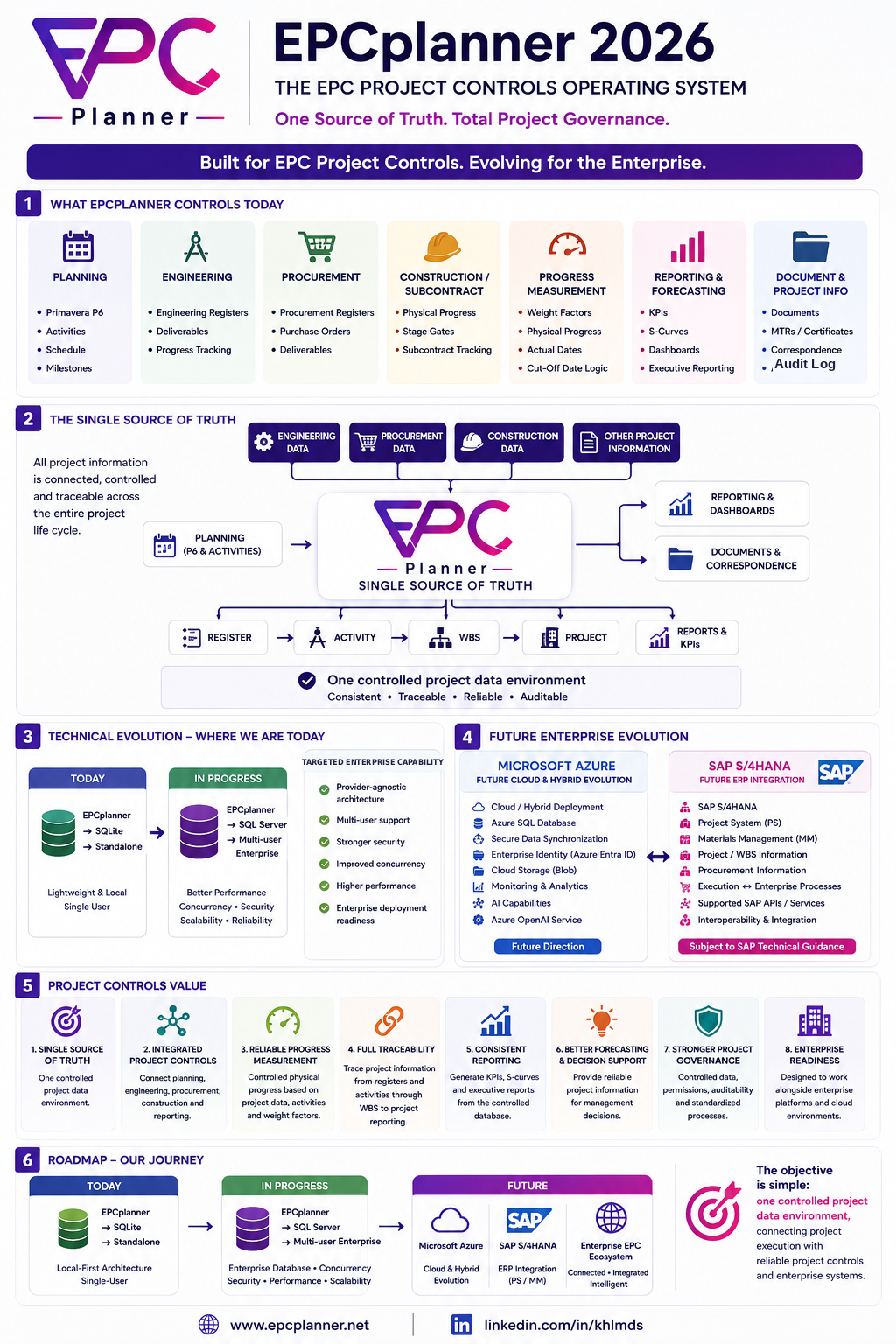
EPCplanner's database architecture is provider-agnostic by design, so it can evolve from a single-user SQLite engine toward a multi-user SQL Server backend, and eventually toward Microsoft Azure and SAP S/4HANA integration, without rewriting the application. The Azure and SAP paths shown below are future directions, not delivered capabilities.
Want a deeper technical conversation?
Contact us to discuss deployment options, database architecture and integration with your existing scheduling environment.